


Practical AI search optimization guide for technical content (+7 tips)
Search has changed. Developers still want answers they can trust. Here’s how to create technical content that gets picked and clicked.


The internet is already flooded with AI search optimization tactics (also known as generative engine optimization or AI SEO). Some advise adding schema, refreshing old posts, chasing snippets, or optimizing metadata. Others go further, asking you to calculate vector similarity scores, inject dense keywords into embeddings, or split articles into retrieval-optimized chunks.
These are useful starting points and help with retrieval. However, for technical content teams, retrieval isn’t the end goal, but trust and clicks.
46 percent of developers say they don’t trust the accuracy of AI results, and 75% would ask for help when they’re unsure of AI’s outputs.
According to Stack Overflow’s 2025 survey, 46 percent of developers say they don’t trust the accuracy of AI results, and 75% would ask for help when they’re unsure of AI’s outputs.
That shift opens a window for technical content to stand out in a system where AI tools summarize your work without a click, and retrieval layers often skip attribution altogether.
When AI delivers a close but incomplete response, it creates confusion. Developers rely on technical content to make decisions, navigate version quirks, and bridge the gap between docs and reality. A half-right answer can pull them down the wrong path and cost hours of debugging time.
That’s where your content can become the next tab they open, and a source they can trust.
We ran several experiments to capture the different scenarios and the results are documented in this article.
If you lead content for a developer-facing team, this is your manual. You’ll learn how to create content with enough shape and signal to earn trust and clicks in a new search and retrieval environment that flattens everything else.
Read: Is your AI search optimization missing the developer behavior?
TL;DR
- Focus on MOFU and BOFU depth with practical constraints and trade-offs
- Use videos and diagrams to create a content moat AI can’t remix
- Break docs into modular debugging blocks instead of walkthroughs
- Add decision context to show what was chosen, skipped, and why
- Show real output through logs, metrics, and terminal screenshots
- Test content for value loss when summarized
- Audit your top 20 search queries weekly in AI search tools
How AI search results are generated and where they help
These interfaces behave differently, and understanding their mechanics is key before deciding how to adapt your content.
AI summaries, such as Google’s AI Overviews or Bing Copilot, condense existing information from various sources. AI search engines, like ChatGPT, Perplexity, or Google’s AI Mode, generate original responses using retrieval and LLMs.
These systems may both use LLMs, but AI summaries typically work from a fixed set of indexed pages. The engine gathers existing content pieces, assembles them into a concise overview, and links to the cited sources.
It’s more of a compression layer. You’re likely to get a summary that reflects the consensus on a topic, particularly when the same advice shows up across docs, blogs, and forums.
AI search, on the other hand, tries to be more dynamic. If it uses retrieval, it takes your question, finds similar chunks of content (from docs, GitHub, posts, etc.), and then hands that over to a language model to draft a response.
The model takes it a step further by filling in blanks, refining wording, and occasionally incorporating general knowledge from its training data. Unless citations are surfaced, it’s often hard to know what came from where.
That’s not always a bad thing, though.
Take a simple example. We asked, “How do I create a virtual environment in Python?” The AI gets it right because the web is full of nearly identical instructions:
- Run
python -m venv venv - Activate it with the right command for your OS
- Install dependencies with
pip install
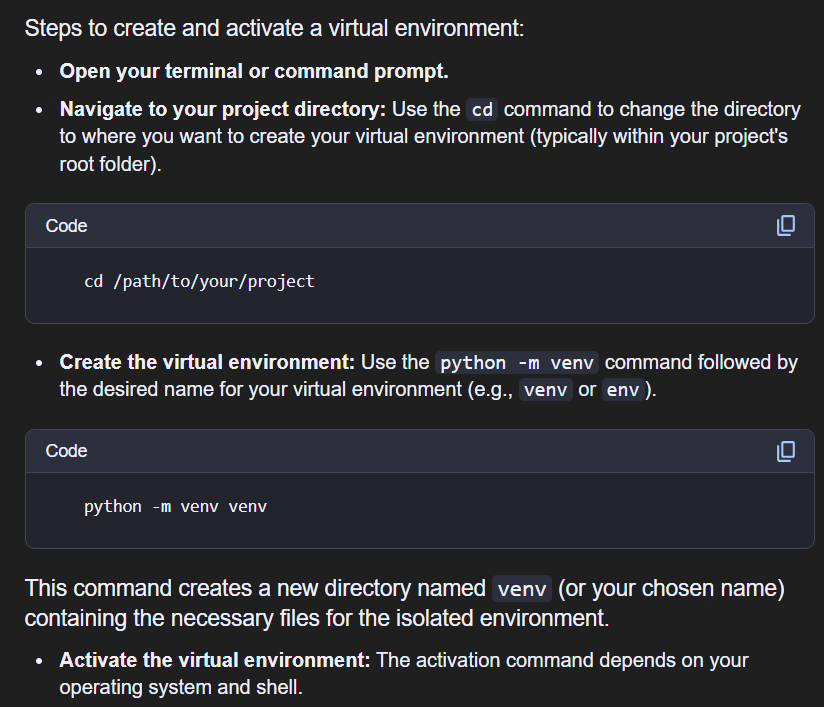
This is where AI search is genuinely helpful. For quick syntax lookups, command explanations, or a fast overview of an unfamiliar domain, you can get an answer in seconds without digging through complete documentation.
You can also ask how to convert a React form to Vue or translate Terraform config to Pulumi. The answers may not be perfect, but they surface useful starting points by borrowing structure from multiple sources.
Moreover, AI search can blend two known ideas, e.g., “How to use Cloudflare with Supabase,” into a working summary, even if no article exactly matches that phrasing.
Why AI search often falls short in technical queries
In our experiments, this gap showed up most clearly when the queries moved beyond basic syntax into version quirks, enterprise configs, and tool-specific behaviors. The answers looked correct, but the workflows quietly broke. Whether the response helped or misled depended entirely on how closely the scenario matched what the model expected.
For instance, we asked both ChatGPT and Google’s AI Overviews, “How do I add a page to Nextcloud’s documentation?” and both gave us the standard workflow:
- Find the source files
- Write content in
reStructuredText - Add the page to the
toctree - Run
make htmlto build
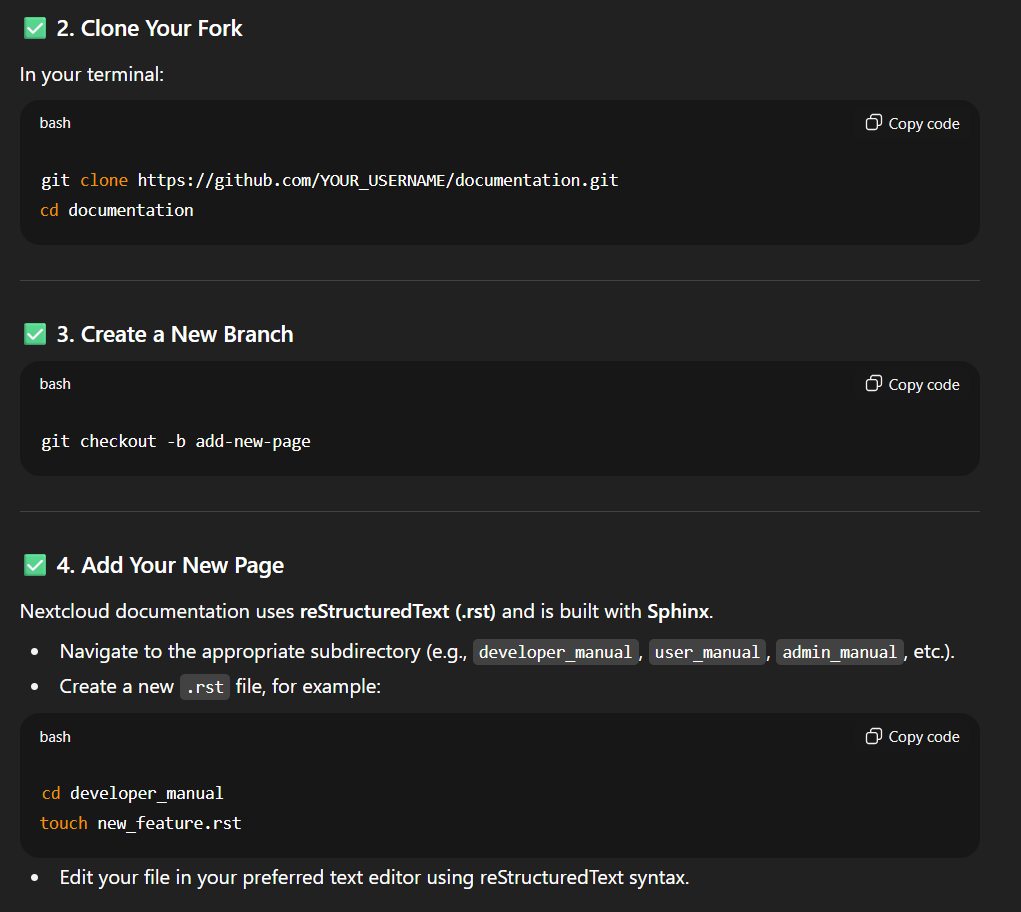
That advice looked right, and matched what you’d see in countless tutorials. But in practice, none of it worked at the time of conducting this test.
You see, Nextcloud doesn’t use the default Sphinx setup. Their documentation relies on a custom-built system with various commands and requirements. None of the AI’s suggestions applied. The instructions would quietly fail, and unless you already knew better, you’d only find out after wasting time.
To get it right, we had to read the contributor guide, dig through issues, and manually test commands until we found the correct path.
That’s the context problem. The AI drew from general documentation and overlooked the custom logic that actually shaped how this system operates.
This isn’t rare. Most engineering decisions depend on the stack, the edge case, the version, and the tooling. What works in one environment might not work in another.
Why some content still earn clicks in AI search results
AI tools tend to flatten content that covers familiar tools, broad workflows, or generic advice. These topics show up in many sources in a similar form, so when AI tools summarize or generate, they lose little by folding them into high-level overviews.
We observed that this dynamic affects top-of-funnel (TOFU) content the most, as mentioned in our earlier article about AI search and what CMOs should do. Users searching for basic “how to” or “what is” queries often get what they need from summaries.
However, recent search trends suggest that this risk is also moving into the middle and decision stages (MOFU, BOFU). AI Overviews are increasingly summarizing content with comparisons, product evaluations, and even case studies, although often in simplified or partial form. The more common the format, the more compressible the content becomes.
Let’s say you search for “Hasura alternatives.” Most articles list the same group of tools, including AppSync, Directus, Prisma, and PostGraphile, with a brief list of pros and cons. AI doesn’t need to cite the full article to replicate this. It can extract patterns, remix phrasing, and generate a usable answer, as seen below.

Now compare that to a post showing:
- Which query features didn’t work as expected in production
- The console errors encountered and how they were debugged
- The impact on cold start times with AWS Lambda
- A schema diff showing what had to change during the migration
That post is still more likely to earn the click.
In chat-style interfaces like ChatGPT, Perplexity, or AI Mode, the implications go deeper. Because users can ask follow-ups, the pressure is higher for source content to present context and edge cases upfront.
A query like “What changed in GitHub Actions cache behavior after v3.6?” needs source material with that version-specific detail. The model can’t hallucinate it. See an instance below where ChatGPT was forced to search and retrieve info from the source:
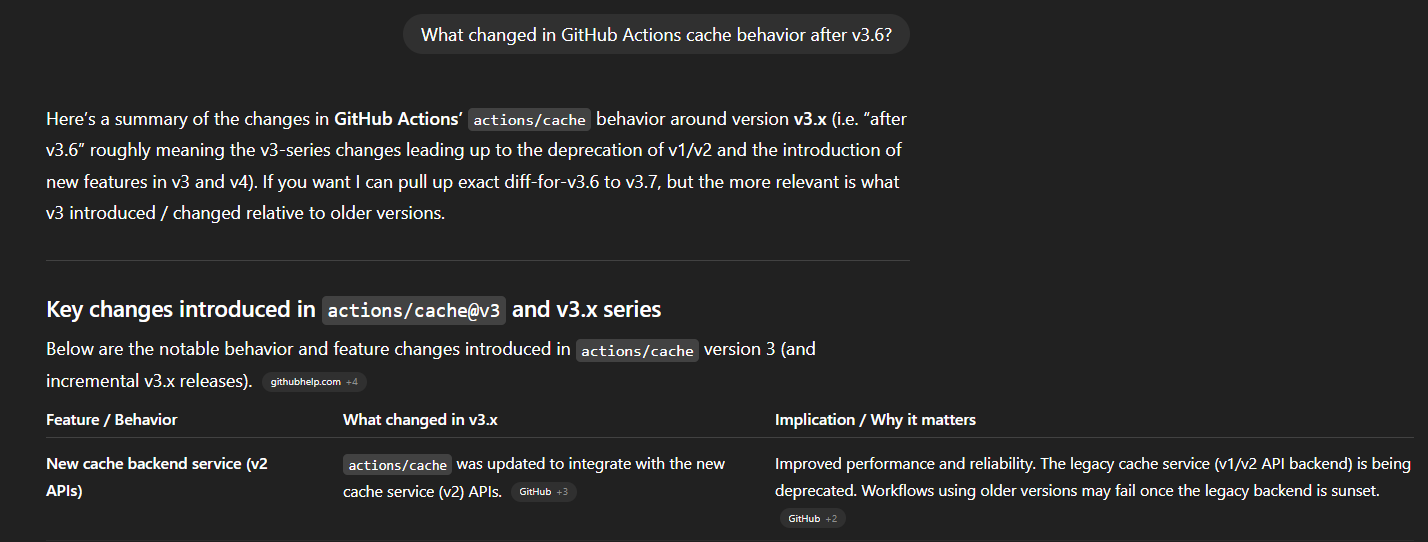
This is where optimization shifts from keywords to structure, depth, and defensibility.
If AI can flatten your article into a generic answer, it will. But when your content carries context and edge cases that summaries skip and models can’t invent, it forces the system to come back to you. That’s the difference between being the input and being the reference.
So how do you structure your content to survive the flattening and earn the click?
7 AI search engine optimization strategies for technical content
Whether your content is being compressed into AI summaries or rephrased in chat-style search, these steps help you stay useful and clickable.
Step 1: Deepen your MOFU and BOFU content to resist flattening
Comparisons, benchmarks, product evaluations, and architectural explainers are no longer safe from flattening. If your content says “Tool A vs Tool B” but lists pros and cons, AI will summarize it, and users won’t need to click.
To keep your valuable content clickable:
- Include actual constraints you tested (e.g., cold start times, rate limits, migration steps)
- Show the trade-offs your team faced and why you ruled something out
- Share diffs, screenshots, or links to issues that shaped your evaluation
- Don’t write for everyone, but for someone with your specific problem
In its May 2025 guidance on AI Overviews, Google advised creators to focus on unique, non-commodity content that satisfies real user needs. They noted that as search evolves to handle longer and more specific queries (including follow-ups), pages that go deeper and provide practical context will be better positioned to earn blue links in search results.
The MOFU and BOFU metrics that tell you whether this depth is working, activation signals, depth of use, advocacy, are covered in the developer marketing metrics guide.
Step 2: Use video and visuals to break remixability
AI-generated summaries can remix phrasing, repackage lists, and even combine sources, but they can’t watch your video. At least not yet.
An interesting comment from William is that AI can parse videos in isolation to retrieve their transcripts. This may be used by ‘agents’ in the future when sourcing information. Fingers crossed.
Models like ChatGPT and Gemini can only read transcripts or captions. For example, I gave ChatGPT this URL to inform us of its content, and ChatGPT responded with this:

That limitation becomes your edge, as video remains harder to summarize, remix, and hallucinate.
Recently, YouTube citations in Google’s AI Overviews have increased by over 25%, showing that video is gaining relevance even in compressed retrieval formats. This is an example when I googled ‘how to use Claude’s MCP server.’

Google also explicitly recommends pairing content with “high-quality images and videos” to help it succeed in AI-powered search.
For technical content teams, this is your moat. You need to supplement your migration guides, performance explainers, or integration tutorials with walkthrough videos. Add diagrams and architecture visuals that a model can’t summarize in three bullets. The more complex your content is to repackage without context, the more valuable it becomes.
At Hackmamba, we have internal graphics designers who create illustrations for all our clients’ content. We are also making headway on video production for our clients!
For the specifics of what developers expect from technical video, format, length, narration style, supporting materials, the developer video content guide covers findings from a 101-developer survey.
Step 3: Break documentation into modular debugging blocks
Developers don’t debug in a straight line. They jump between threads of cause and effect. Your content should match that pattern.
You should no longer write long linear walkthroughs. Break guides into modular sections. Each section solves one small piece. For example, retry strategies are linked to backoff mechanisms, which in turn are linked to circuit breakers. Everything has an edge to grab.
Documentation Tips: If you’re using Mintlify, you can create collapsible sections using the
<Accordion>component and setdefaultOpen: trueto expand them by default. Group related content into<AccordionGroup>blocks to enable multi-level navigation. These tools allow readers and AI to access the necessary configuration details directly.
Step 4: Add decision context and trade-offs
Sometimes, the most valuable part of the page is the thing you didn’t choose. Add lightweight ADR-style blocks at the end of technical guides.“Here’s what we chose, what we ruled out, and why.” These decisions often matter more than the steps.
Step 5: Show real output to validate fixes
Every fix you publish should include proof. That could be:
- A terminal output
- A working curl command
- A screenshot from a tracing dashboard
- A metric graph that changes
If the reader has no way to validate the outcome, they’ll bounce or worse, guess.
Step 6: Test your content for value loss when summarized
Before publishing, run every piece through five questions:
- If this were summarized, would value be lost?
- Does it include live output, logs, or real config?
- Can the reader validate the result without guessing?
- Would I bookmark this for reuse?
- Will this still hold up after the next release?
Three yeses? Ship it. Less than that? You need to add context.
Step 7: Audit weekly for visibility in personalized search results
Run AI content audits the same way you’d test a new onboarding flow:
- Define your top 20 queries
- Run them through Perplexity, Google’s AI Mode, and ChatGPT with browsing
- Score for correctness, citation, and context loss
- File tickets in your docs backlog
You don’t fix everything in one sprint. But you ship improvements weekly.
Bonus: Structure docs for AI-powered search and agents
This is a common practice now, but a necessary reminder. You need to start thinking of docs like APIs. AI Agents are here, and they don’t click around.
You need to:
- Expose your docs via a clean sitemap and
[llms-full.txt](https://mintlify.com/docs/llms-full.txt) - Serve OpenAPI specs or GraphQL schemas where it makes sense
- Use headings, semantic structure, and stable URLs
- Add structured data (FAQ, how-to, changelog)
Note: Mintlify, Docusaurus, and Nextra all support this out of the box. OpenAI supports Structured Outputs via JSON schemas, enabling the model to produce data in expected formats. Perplexity likewise offers structured output modes (JSON Schema, Regex), prompting content to be machine‑friendly.
If your docs are built with structure in mind, they’re more likely to be parsed, cited, and surfaced well.
Next steps
AI search interfaces are becoming a primary way developers discover technical information. They have replaced the predictability of traditional search results with synthesized answers, citations, and condensed context. For technical content teams, this means content needs to do more than rank. It needs to be useful enough to be referenced, cited, and trusted by AI systems.
The fundamentals remain the same. Strong topical authority, clear information architecture, deep technical expertise, and content that solves real developer problems are still the foundation. The difference is that your content now needs to perform in both traditional search engines and AI-powered search experiences. The SEO for developer tools guide explains how to build that foundation through developer-focused content, topical authority, and search visibility.
As AI search continues to grow, content also needs evidence, implementation details, trade-offs, examples, and original insights that AI systems can confidently surface. Topics that developers actively research and problems that require nuanced explanations are often the most likely to earn visibility.
If you're leading content at a technical company, your job now includes optimizing for AI visibility alongside traditional SEO.
Pick your top five guides and run them through ChatGPT, Claude, Gemini, or Perplexity. Were they cited? Was important context preserved? Did your expertise survive the summary?
If not, you've identified the next area to improve.
If you're looking for help building a search strategy that works across both traditional and AI-powered search, Hackmamba is an SEO agency for devtools. We help developer-focused companies grow through technical content, documentation, topical authority, and search programs designed to drive qualified developer traffic, product adoption, and pipeline.