



The developer marketing metrics you should track (funnel-wise)
This guide shows how to measure developer marketing by tracking the KPIs when developers notice, try, and adopt your tool.

I shared 3 developer marketing strategies for each stage of the funnel recently, and the follow up question was how to measure those marketing efforts. Developer marketing metrics are rarely discussed in depth. In most devtool teams, reporting ends up being page views, signups, or community activity screenshots. None of these show whether developers are actually moving closer to adoption or advocacy.
This isn't the '7 best developer marketing metrics' kind of blog, this piece focuses on the core key metrics you can measure across the developer funnel: when a developer notices a tool (TOFU), when they try it (MOFU), and when they bring it into a project (BOFU). The goal is to track those metrics with consistency, so we can see where momentum builds and where the developer experience can be made clearer.
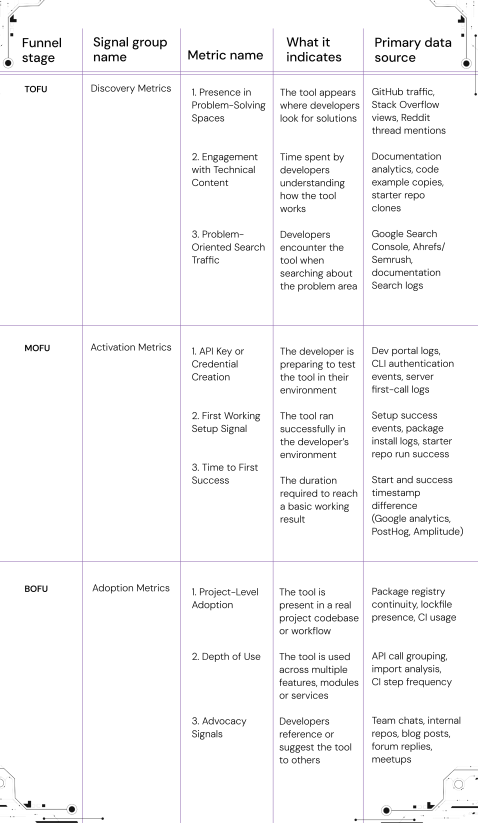
3 developer marketing metrics for each stage of the developer funnel
Once you understand how a developer naturally moves from discovering a tool to trusting it in real work, the next step is deciding what to measure at each point in that developer journey. The purpose of developer marketing metrics is to understand whether developers are progressing forward. If they are not, the work is to find where friction is happening and reduce it.
We will walk through the funnel stage by stage, and identify the right metrics that signal movement.
TOFU: Discovery metrics
At this stage, the focus is on the tool being present in the developer’s environment. The aim is for the tool to be seen, recognized, and stored in memory for later use. Developers are observing, scanning, and collecting information during this phase.
1. Impressions and reach
This reflects how often the tool appears in spaces where developers look for solutions, learn, and exchange knowledge.
What to track?
| Signal | Description |
|---|---|
| GitHub repo views | Developers encounter the tool while reviewing or exploring code |
| Stack Overflow question views | Developers see the tool during troubleshooting |
| Community thread visibility | The tool appears in ongoing discussions |
How to capture this metric?
| Where it happens | What to capture | How to set it up | Signal Meaning |
|---|---|---|---|
| GitHub Insights → Traffic | New users and top referrers | Record weekly numbers in a simple sheet or dashboard | Shows the tool is being noticed during code exploration |
| Stack Overflow | View counts on questions mentioning the tool | Log monthly view counts for the same set of URLs | Shows the tool is seen during debugging and learning |
| Reddit / Slack channel / Discord / Forums | Mentions in technical conversations | Weekly manual keyword search or TrackReddit alerts | Shows the tool is being acknowledged in shared team knowledge |
2. Engagement on technical content
This measures whether a developer is actively trying to understand the tool in a hands-on way through developer videos or through content, in other words this is also called as the 'developer engagement'
What to track?
| Signal | Description |
|---|---|
| Documentation depth of navigation | Developer moves beyond the landing page |
| Code sample copy events | Developer copies example snippets |
| Starter repo clones | Developer downloads or forks an example project |
How to capture this metric?
| Where it happens | What to capture | How to set it up | Signal Meaning |
|---|---|---|---|
| Documentation site | Event: docs_page_path_depth and scroll depth | Track via google analytics, Plausible, or PostHog | Shows exploration into workflow understanding |
| Code blocks | Event: copy_code_sample | Add a click event to copy buttons | Shows intent to test code in local environment |
| GitHub Insights → Traffic | Clone counts and referrers | Review weekly in the Traffic tab | Shows preparation for hands-on evaluation |
3. Traffic from problem-oriented searches
This metric measures whether developers discover your product while researching a technical problem. At this stage, they are looking for answers, implementation guidance, code examples, or proven approaches they can apply immediately. When your content appears during that research process, your product becomes one of the solutions they consider as they explore ways to solve the problem.
Consistent visibility at this stage is driven by a strong organic search strategy. The SEO for developer tools guide explains how to build topical authority through developer-focused content, keyword architecture, and GEO optimization for AI-powered search experiences.
What to track?
| Signal | Description | Signal Meaning |
|---|---|---|
| Searches tied to the problem your tool solves | Developer is researching a task area, not a tool name | The tool is discovered at the point of need |
| Search-driven clicks to docs or tutorials | Developer selects your solution path | The tool enters the mental shortlist of possible approaches |
| Stable ranking for problem queries | The tool maintains presence in recurring problem searches | The tool remains discoverable over time |
How to capture this metric?
| Where it happens | What to capture | How to set it up | Signal Meaning |
|---|---|---|---|
| Google Search Console | Impressions and clicks for problem keyword queries | Review monthly in Performance → Queries | Shows the tool appears during solution research |
| Ahrefs / Semrush | Ranking movement for key problem topics | Track 10–20 problem-focused search terms | Shows consistency of presence at discovery points |
| Documentation or site search logs | Frequently searched problem phrases | Review internal site search reports | Shows what problems developers associate with your tool |
MOFU: activation metrics
One of the important developer marketing metrics, at this stage, the developer is trying to understand whether the tool fits their environment. They are testing it in a low-risk space. The movement here is defined by reaching a small working result. The key signal is whether the developer goes from reading to running something.
1. API key or credential creation
This metric reflects the moment the developer prepares to test the tool in their own environment.
What to track?
| Signal | Description |
|---|---|
| API key created | The developer has taken the step to authenticate and run the tool |
How to capture this metric?
| Where it happens | What to capture | How to set it up | Signal meaning |
|---|---|---|---|
| Developer Dashboard or Console | Event: api_key_created | Log key creation event with timestamp | Developer is preparing to evaluate the tool in real context |
| CLI / SDK | Event: auth_attempt or auth_success | Emit telemetry only on successful authentication (opt-in recommended) | Developer is connecting the tool to local runtime |
| API Gateway or Server Logs | First successful request using key | Track first request timestamp and status code | Developer reached an authenticated working state |
2. First working setup signal
This metric captures the moment when a developer has successfully installed or initialized the tool and reached a basic working state. It marks the transition from understanding into trial.
What to track?
| Signal | Description |
|---|---|
| Completion of the Quickstart or Getting Started path | The developer reached the end of a guided setup flow |
| Package, SDK, or CLI installed and run locally | The tool is now present in the developer’s environment |
| Starter project or example application running successfully | The developer has confirmed that the tool works in practice |
How to capture this metric?
| Where it happens | What to capture | How to set it up | Signal meaning |
|---|---|---|---|
| Documentation site | Start of setup path | Track event: setup_started on Quickstart or Getting Started links | Developer begins evaluating the tool directly |
| Package manager / dependency install | SDK downloads or installing a package, module. | Use registry dashboards for npm, pip, Go, NuGet, Cargo, etc. | Developer is preparing to run the tool locally |
| CLI / Local initialization | Successful setup command or first run | Emit event: setup_success after successful initialization (opt-in recommended) | Developer has reached a working initial state |
| Starter repo or template | Clone or download of example project | GitHub Insights → Traffic → Clone count + referrers | Developer intends to integrate or explore the tool in their workspace |
What counts as a completed first setup?
A valid first setup is when the developer:
- Installs the package or dependency
- Follows one direct doc path
- Runs a basic example without modification
- Sees a successful output (even if minimal)
This is the smallest possible meaningful success.
3. Time to first success
This metric reflects how long it takes a developer to reach a basic working outcome after they begin setup. It shows the pace of understanding and how quickly confidence forms.
What to track?
| Measurement | Description |
|---|---|
| Average time from Quickstart start → first successful run | The duration between beginning setup and seeing a working result |
| Median time across all developers | A stable signal that reduces the effect of outlier cases |
How to capture this metric?
| Where it happens | What to capture | How to set it up | Signal meaning |
|---|---|---|---|
| Documentation site | Starting the setup path | Track event: setup_started on the Quickstart or Get Started link | Marks the moment the developer begins setup |
| CLI, SDK, or local workflow | Completion of the first working run | Emit event: setup_success only on a successful run | Indicates the developer reached a basic functional state |
| Example project or starter repo | Time between clone and first commit or run | Use GitHub clone timestamp + local event or commit time (if available) | Shows how quickly the example leads to working output |
Industry benchmarks
| Tool Type | Healthy Time to First Success (Approx.) |
|---|---|
| Auth / API client libraries | 5–15 minutes |
| Framework or SDK integration | 15–45 minutes |
| Infrastructure or deployment tools | 45–90 minutes |
BOFU: adoption metrics
At this stage, the developer is deciding whether the tool becomes part of actual work. This is where the tool moves from testing into daily or recurring use.
1. Project-level adoption
This metric shows whether the tool is present in an active project. It reflects ongoing use inside a real codebase or environment.
What to track?
| Signal | Description |
|---|---|
| The tool is present in dependency files or manifests | It is included in the project setup |
| The tool runs in CI or deployment workflows | It is required during development or release |
| Multiple contributors interact with or commit around it | The tool is part of the team workflow |
How to capture this metric?
| Where it happens | What to capture | How to measure it | Signal meaning |
|---|---|---|---|
| Package registry usage | Sustained installs from the same environment or org | Registry analytics for npm, pip, Go, NuGet, Cargo | The tool persists beyond the initial test |
| Project codebase | Dependency entry in lockfile or build file | SBOM scan, dependency monitoring, or internal registry logs | The tool is now part of application code |
| CI / Build pipeline | Recurring execution in build or test steps | CI logs or usage pings | The tool is active during ongoing development |
2. Depth of use
This metric reflects how fully the tool is being used inside the project. It shows whether the developer is relying on core features only, or incorporating advanced capabilities as the project grows.
What to track?
| Signal | Description |
|---|---|
| Use of multiple features or modules | The tool is supporting more than one task or integration point |
| Expansion to additional services or components | The tool appears in more areas of the codebase |
| Increasing API call volume or api usage | The tool is involved in ongoing or repeated activity |
How to capture this metric?
| Where it happens | What to capture | How to measure it | Signal meaning |
|---|---|---|---|
| API or service logs | Requests grouped by feature or endpoint | Count calls per feature and track weekly trends | The developer is using more parts of the system |
| Codebase or repo structure | References to multiple modules or configuration paths | Search across directories or analyze import/require statements | The tool is part of several parts of the project |
| Build and deployment pipelines | Commands or steps involving the tool | Review CI/CD workflow files or step execution history | The tool plays a role during active development cycles |
3. Advocacy metrics
This metric captures the point at which developers start recommending the tool to others. They mention it in conversations, share it within their teams, reference it in community discussions, or suggest it as a solution to a specific problem. These actions signal that the product has delivered enough value to earn trust and become part of the developer's toolkit.
Building this kind of advocacy requires more than a good product. Strong developer communities, consistent engagement, contributor programs, and effective DevRel initiatives all help create the conditions for developers to share and recommend a tool organically. The strategies behind these programs are explored in six lessons from experts on building developer communities.
What to track?
| Signal | Description |
|---|---|
| Mentions in internal team discussions or channels | The tool is being recommended inside a working environment |
| References in documentation, READMEs, or boilerplate setups | The tool has become part of shared patterns |
| Mentions in developer communities | The developer is sharing experience in public spaces |
How to capture this metric?
| Where it happens | What to capture | How to measure it | Signal meaning |
|---|---|---|---|
| Internal communication platforms | Mentions of the tool in Slack, Teams, or Discord | Light manual weekly logging or search alerts | The tool is being shared across teammates |
| Team or company repos | References in internal READMEs, skeleton repos, or code templates | Search repos for imports, config blocks, or setup steps | The tool is now part of organizational development patterns |
| Developer Community spaces | Mentions in Stack Overflow, GitHub issues, Reddit, dev blogs, or meetup talks | Set periodic alerts or manual sweeps | The developer is sharing lived experience with others |
Wrapping up
At Hackmamba, a developer marketing agency, we study how developers move from discovery to adoption. Every stage of that journey leaves signals behind. Some show how developers first discover a product. Others reveal when they reach a meaningful outcome, integrate the tool into their workflow, or begin recommending it to others.
Tracking these signals helps us understand where momentum is building and where friction exists. When developers drop off during onboarding, struggle to find answers in the documentation, or fail to reach a successful first implementation, the data usually points to the problem. From there, we can improve the experience through better documentation, clearer technical content, stronger onboarding flows, or more relevant developer education.

Inside the launch of VectorAI DB
How Actian positioned VectorAI DB for developers and drove adoption from day one




The goal is not simply to improve individual metrics. It is to create a smoother path from initial discovery to long-term adoption. When developers can consistently find value, understand the product, and achieve success quickly, adoption becomes more predictable and sustainable.
These signals are closely connected to the broader go-to-market motion. The developer-led GTM strategy guide explores how sales and marketing teams can use developer intent signals to identify buying momentum and engage accounts effectively. For a complete view of the developer marketing programs that influence these outcomes, the complete developer marketing guide covers strategy, channels, GTM, and measurement end to end.
FAQs:
- How should I plan a marketing budget based on these metrics?
Plan budget around the stages where developers show movement. If the discovery metrics are low, invest in visibility in problem-solving spaces and technical content. If activation metrics are slowing, direct budget toward improving documentation, examples, and the first working setup experience. If adoption signals are steady but not growing, focus on community education, deeper tutorials, and shared workflows. The budget follows the developer journey. You put resources where progress needs support.
- What are the key performance indicators for developer marketing?
Key performance indicators can be grouped by funnel stage. Discovery KPIs include impressions in problem-solving spaces and documentation engagement. Activation KPIs include API key creation, first working setup, and SDK interactions. Adoption KPIs include project-level usage and recurring usage inside CI or development cycles.
- What conversion rates matter in developer marketing?
Useful conversion rates are the ones that reflect progress. For example: impressions → documentation visits, documentation visits → API signups, API signups → first successful call, or first successful call → daily active usage. These conversions show movement through the funnel.
- How do we measure success in developer marketing?
Success is measured by how many developers reach stable usage. Look at daily active users, sustained SDK interactions, recurring API calls, and presence in real projects. These signals show that the tool has become part of real work.
- Are signups extremely important in developer marketing?
Signups are useful to track, but they matter most when they lead to first use. A signup shows interest. The key is what happens after it. Watch how many signups move to a first working setup, then to returning usage. This shows whether developers find value and continue forward.