



How to launch a developer tool or tech product on Product Hunt (2026 guide)
Eight tips for launching a developer tool or tech product on Product Hunt in 2026, from algorithm mechanics and gallery strategy to launch day operating models, with insights from Flo Merian.

Product Hunt is a reliable way for developer tools and tech products to get in front of early users when the launch is prepared well. Teams use it to validate interest, refine messaging, and collect their first meaningful wave of users. Recent launches from tools like Cursor, Aikido, and Kilo Code show how effective the platform can be when the groundwork is done properly.
At the same time, there is persistent confusion. Teams still ask how to reach the top of the day or week, whether a Hunter is necessary, and what preparation actually looks like. Part of the reason is that Product Hunt is a living platform. What worked a year ago does not always work today. The mechanics, expectations, and signals evolve, which is exactly why a current, experience-backed guide matters.
To make this guide as practical as possible, I spoke with Flo Merian, one of the most active hunters on Product Hunt, who has supported 200+ developer tool launches and maintains awesome-product-hunt, a public collection of standout launches for reference. His inputs, paired with what we see across the developer ecosystem, form the eight tips in this guide. They focus on the decisions that shape how developers understand your product and how your launch performs on the day.
Note: A Product Hunt launch is an awareness tactic within a broader developer marketing program. The developer marketing guide covers how awareness-stage tactics like this connect to activation and adoption, so you can plan what comes after launch day traffic.
How to launch a developer tool or tech product on Product Hunt
To launch a developer tool or tech product on Product Hunt successfully: bring in a Hunter early to pressure-test your first impression, understand how the ranking algorithm weights engagement from active users, launch at 12:01 AM Pacific Time and activate your supporter network immediately, prepare all gallery images and copy before launch day, and assign clear ownership for every real-time responsibility before the page goes live. The teams that perform best treat Product Hunt as a repeatable channel, not a one-time event.
Before getting into the tips, it helps to understand what a Product Hunt launch actually delivers.
What to expect from a Product Hunt launch
Flo said something that frames the whole approach:
Product Hunt is primarily for awareness.
A Product Hunt launch gives you exposure and puts your product in front of developers who may not know you yet. It creates attention. What happens after depends on how clearly your product is positioned and how easy it is to try.
For developer tools that perform well, Flo shared a useful benchmark:
A dev-first product that ranks in the Top 4 could get around 1,500 unique visitors in a day.
That attention is a spike, not a guarantee of outcomes. Conversion depends on your landing page, onboarding, and whether the first action is obvious and low-friction.
A launch also centralizes feedback. Comments often surface objections, usage patterns, and phrasing you can reuse as testimonials and positioning inputs. This feedback loop is one of the most valuable outputs of a Product Hunt launch.
Product Hunt also extends beyond launch day. Top products appear in daily and weekly newsletters, adding follow-on visibility. The platform is increasingly used for pre-launch awareness through ads and announcements.
Product Hunt works as an amplifier. It brings developers to your site and into the conversation. Your job is to make sure the product and onboarding are ready when they arrive.
8 tips for launching a developer tool or tech product on Product Hunt
Every strong Product Hunt launch has a few things in common. After going through multiple devtool and tech product launches and discussing them with Flo Merian, certain patterns become obvious. They show up regardless of product category, team size, or audience.
The eight tips below focus on those patterns. Each one highlights a specific action that improves how developers understand your product and how your launch performs on the day.
1. Bring in a Hunter early and refine the first impression
The first impression of a Product Hunt page determines whether a visitor engages further. By the time someone reads the headline and scans the first image, they have already formed an opinion about whether the product is worth exploring. This is why bringing in a Hunter early plays such an important role. Teams become deeply familiar with their own messaging and gradually lose the ability to identify where clarity breaks. A Hunter restores that external perspective. When I asked Flo about this step, he said:
A Hunter could review your inputs, give feedback, and suggest improvements.
That review often uncovers sections that rely on too much assumed context, sentences that introduce secondary ideas too early, and visuals that do not align cleanly with the message.
A refined first impression follows a predictable structure. The headline communicates the value in a way that makes sense without background knowledge. The supporting sentence reinforces the same idea instead of expanding into a separate concept. The gallery and the headline feel connected in meaning. The maker comment explains what is being introduced and where a visitor can begin.
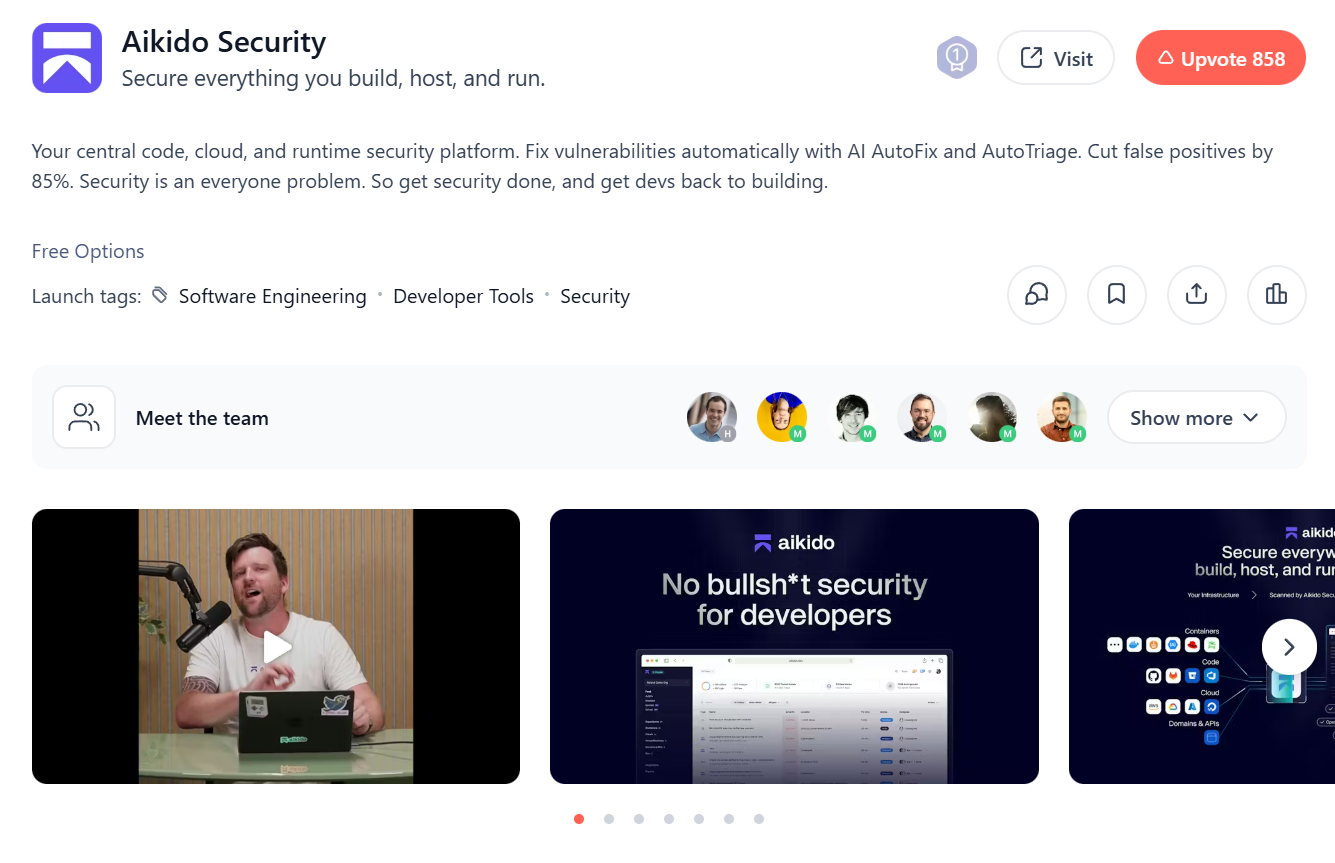
Aikido Security's launch shows how clear first impressions work in practice. Flo was the Hunter for the launch and helped shape how the product was presented on Product Hunt. The page ranked #1 Product of the Day and #1 Developer Tool of the Month, with a simple and relatable tagline, "Secure everything you build, host, and run," that set expectations immediately. Visual assets explained the product workflow, and a focused comment thread reinforced the core message, making it easy for first-time visitors to understand the product.
2. Understand how the Product Hunt algorithm works
To launch a developer tool on Product Hunt successfully, you need a working understanding of how the platform ranks launches. Ranking is not based on raw upvote count. It is based on points, and not every upvote contributes the same number of points.
This was clarified publicly by Mike Kerzhner, the CTO of Product Hunt, who explained that votes from verified and active users carry more weight. Users who contribute thoughtfully through comments and discussions build reputation over time, and their engagement influences ranking more than low-effort activity. Accounts with little history or minimal participation contribute far less.
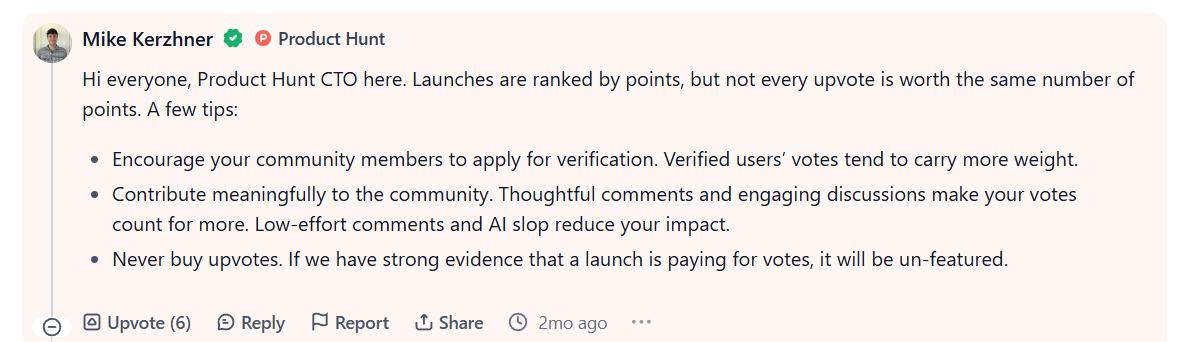
The system also actively filters manipulation. Upvotes from newly created accounts, coordinated voting patterns, or purchased votes can be discounted or lead to a launch being unfeatured entirely. This is why relying on fake accounts or last-minute voting schemes consistently backfires.
Engagement quality matters as much as timing. Early interaction in the first few hours after the daily reset helps a product stay visible, but sustained discussion keeps it there. Threads with replies, follow-up questions, and maker participation remain surfaced longer than pages that receive passive upvotes and go quiet.
A successful devtool launch is not measured by upvotes alone. The real question is whether the launch introduced your product to the right audience and generated meaningful interest. Traffic, signups, documentation visits, community engagement, and product adoption are often stronger indicators of success than a leaderboard position.
The developer marketing metrics guide covers the discovery metrics that help measure this impact, including impressions, engagement, traffic, activation, and adoption across the developer journey.
3. Launch early and build momentum with early adopters
Product Hunt works as a repeatable surface when teams launch early and continue returning with progress. An early launch creates visibility, feedback, and a baseline presence on the platform. Each subsequent launch builds on that foundation.
Early adopters anchor this process. An initial launch brings the first group of users into the product. As the product evolves, those users provide context during future launches by sharing how they use the tool and what has changed since the last release. Building relationships with these early users is often the first step toward creating a community that supports future growth. Our guide on growing an engaging software product community explores how to turn early adopters into active contributors and advocates.
Supabase followed this approach. Their first Product Hunt launch happened when the product was still in alpha. They kept shipping, gathering feedback, and launching again with meaningful updates. Over time, this built familiarity and momentum, leading to stronger outcomes in later launches.
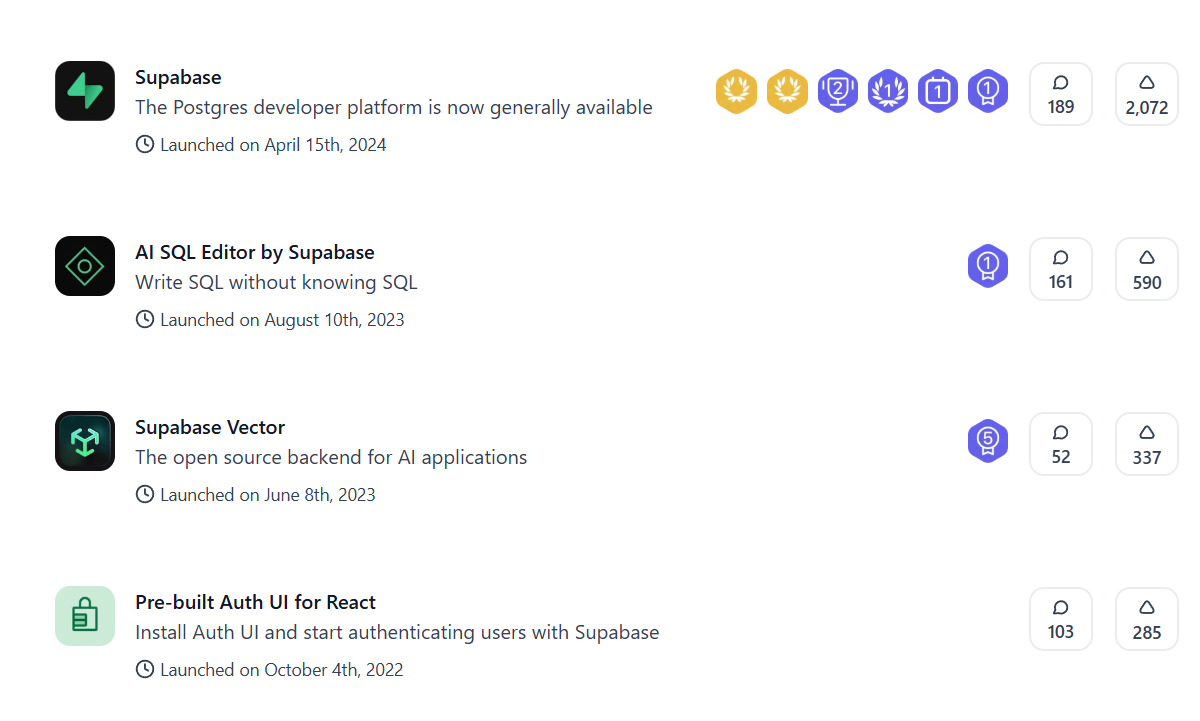
Launch early to establish presence, use early adopters to shape the conversation, and return with meaningful progress. Over time, that combination creates familiarity, trust, and momentum that compounds with each launch.
4. Choose the right launch timing and plan the first four hours carefully
On Product Hunt, timing follows a fixed structure. All launches go live at 12:01 AM Pacific Time by default and remain active until 11:59 PM PT. There is no option to launch later in the day. This makes the first few hours especially important.
The first four hours are a distinct phase of the launch. During this window, Product Hunt hides upvote counts and sorts the homepage more loosely to distribute early exposure. Your objective during this period is to build enough engagement to position the product within the Top 4 once rankings fully stabilize. That early positioning has a direct impact on visibility for the rest of the day.
This also affects when you push externally. Social posts, community messages, and supporter activity should start as soon as the page goes live. Waiting to post later in the day reduces the impact of early engagement, which plays a meaningful role in how the launch unfolds.
The choice of day is more flexible than most teams assume. Mid-week launches still perform well, but weekends can be effective for developer tools. The share of developers browsing Product Hunt tends to be higher on weekends, and conversion rates are often stronger because attention is less fragmented. This pattern is explained clearly in Flo's breakdown on the best day to launch, shown in the screenshot below.
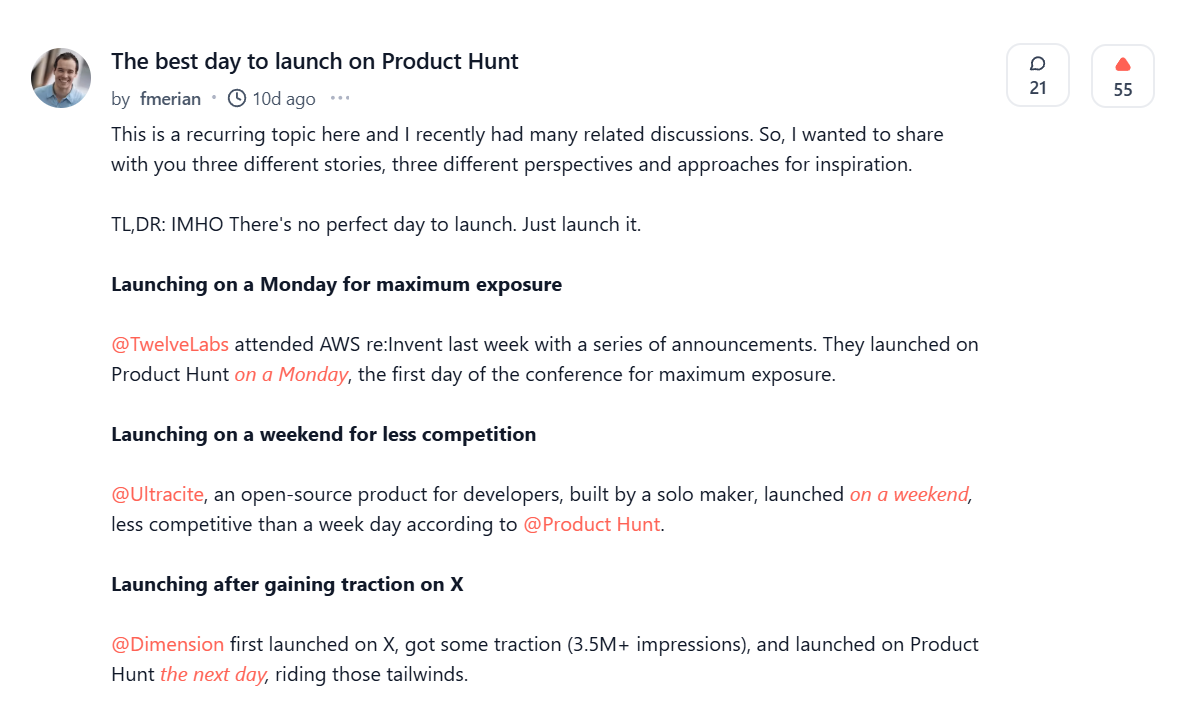
Be ready at 12:01 AM PT. Activate supporters immediately. Focus on the first four hours. Choose a launch day that matches how and when your users are most likely to engage, rather than defaulting to convention.
5. Shape the gallery so it explains the product on its own
On Product Hunt, the gallery carries the explanation. Developers scan images before reading copy, which means the gallery must communicate what the product does, where it fits, and what problem it solves without relying on text.
Product Hunt is a surprisingly visual medium. A great image gallery makes a difference.
Aikido Security's launch is a clear example of this done well. Their gallery followed a deliberate sequence. The opening image set the tone with a direct message aimed at developers. It established positioning immediately and made it clear who the product was for. Subsequent images moved into the product itself, showing the dashboard, findings, and how issues surface inside developer environments. Each image focused on one idea instead of compressing multiple concepts into a single frame.
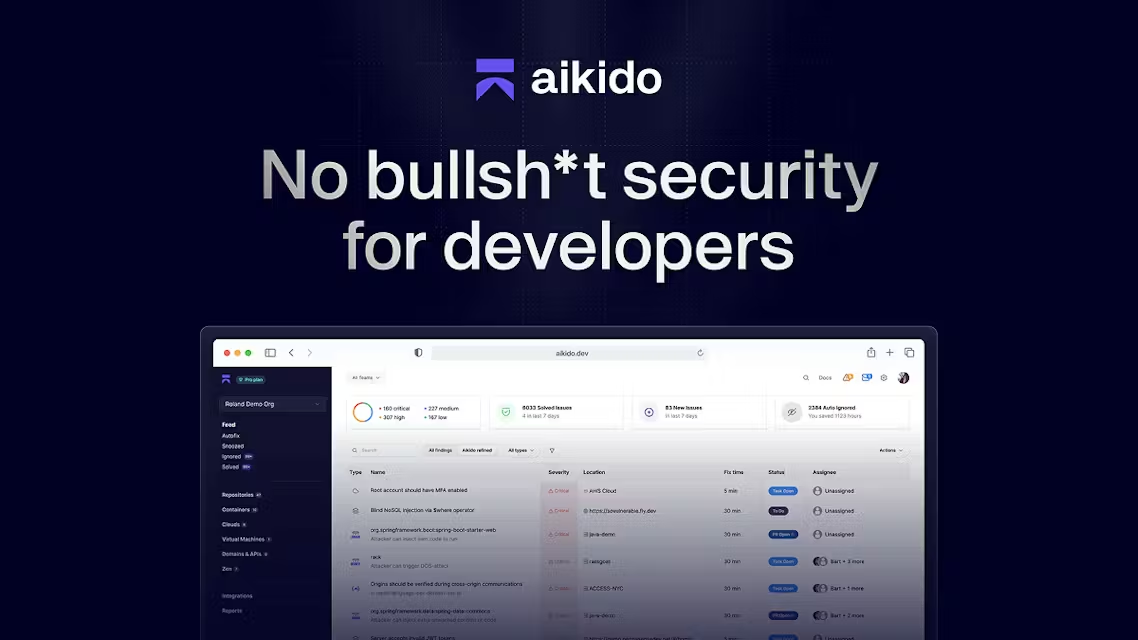
The later images reinforced outcomes rather than features. One frame showed the reduction in noise and false positives. Another visualized how Aikido fits into existing developer workflows through integrations. The final image closed the loop with a clear call to action, making the next step obvious without requiring further explanation.
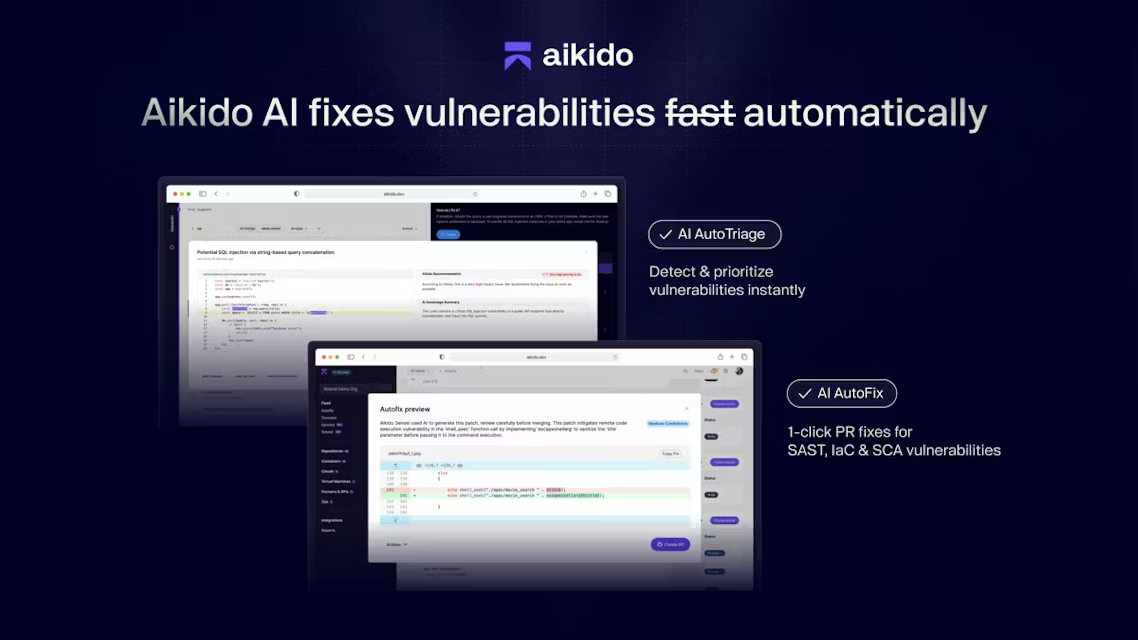
Aikido supported its gallery with a short walkthrough video that shows the product in use. The video starts at the dashboard and moves through the scanning workflow developers care about. It shows how vulnerabilities are detected, grouped, and presented in context, step by step. This worked because the video complemented the images instead of replacing them. The images explained structure. The video explained flow.
Product Hunt recommends using at least three images. A single screenshot cannot establish context, interaction, and outcome at the same time. A short sequence can.
For your launch: start with an image that sets expectations. Follow with workflow screenshots that show how the product is used. Use a short video when behavior matters. End the gallery with a clear call to action. If the gallery can stand on its own, the rest of the page becomes easier to understand.
6. Prepare all communication in advance
The pace of a Product Hunt launch is defined by how much writing and coordination is left for the day itself. Comments arrive continuously, the same questions repeat, and attention comes in short bursts. When communication is prepared in advance, the team can stay present inside the thread instead of switching between drafting and responding. When I asked Flo about this, he put it simply:
Launch days are hectic. Prep as much content as possible so you can focus on engagement on launch day.
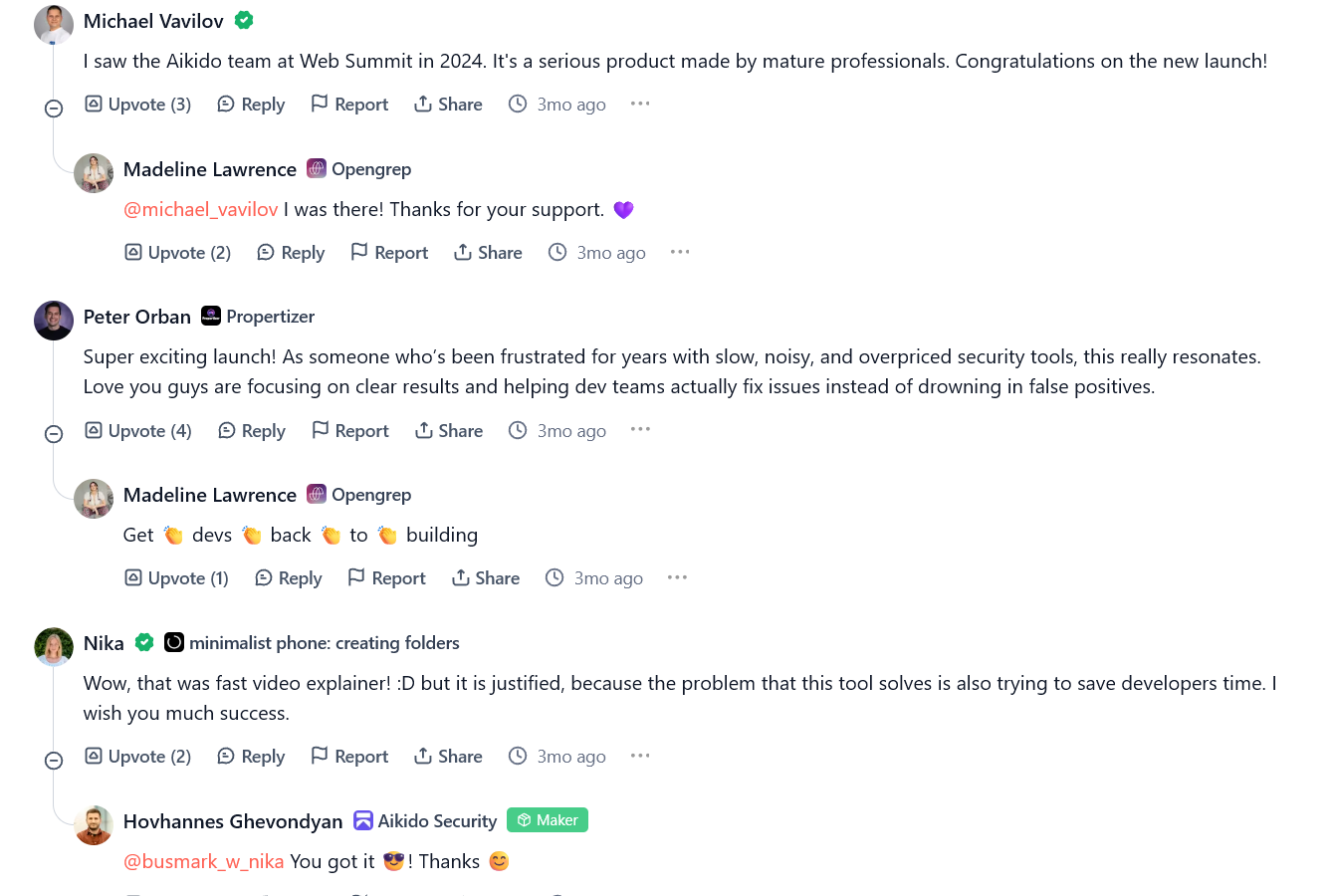
Aikido's launch shows how preparation translates into a clear and effective first comment. Their maker comment was ready when the page went live and stayed focused on three things: what the product does, why it exists, and an invitation to engage. It did not try to explain every feature or pre-empt every question. Instead, it asked for feedback and opened a conversation with developers.
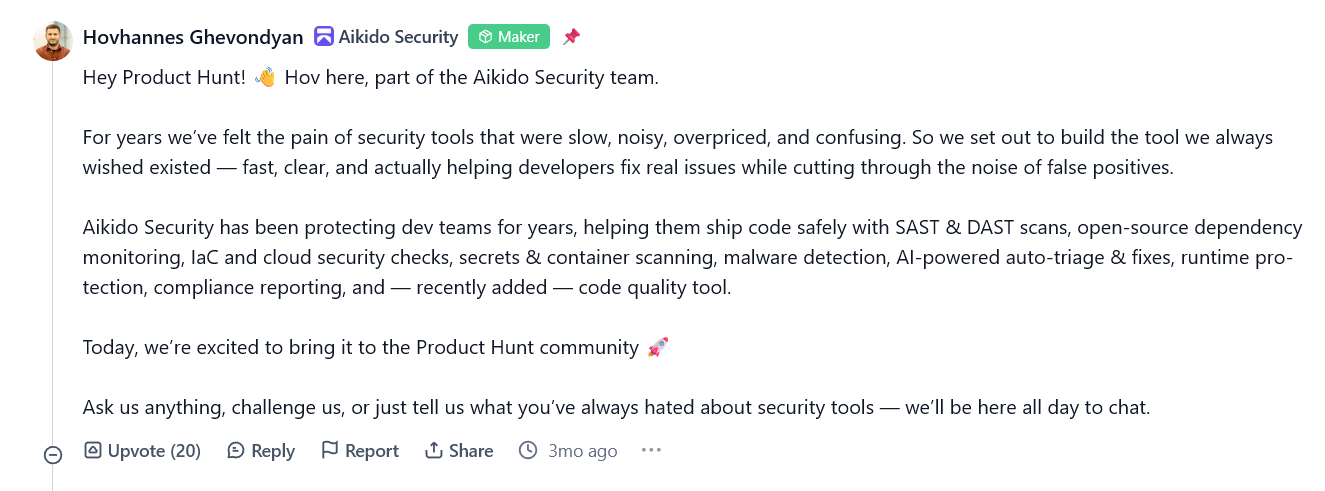
The tone sounded like a developer speaking to other developers, not a launch announcement. The same message carried across the hero section, the gallery, and the comment thread, which made the page easy to follow without repetition. This level of alignment is only possible when the copy is finalized before launch and the team agrees on what not to say as much as what to say.
As the day progressed, the comment thread stayed active with steady back-and-forth. Questions were answered without long gaps. Replies stayed on-message. This level of consistency reflects advance preparation.
7. Write an honest maker comment
The first comment sets the direction of the entire Product Hunt thread. It should clearly state what is launching, why it matters, and what the visitor should try first. When this is done well, it removes early confusion and gives the discussion a clear starting point.
When I asked Flo how teams should approach the first comment, he gave a firm constraint that forces clarity:
Keep it simple, in 800 characters or less. Take Aikido for example. A personal touch would be great. Make sure to add a call-to-action like "go to your website" or "share the launch on socials." Pro tip: Reuse the first comment as a blog announcement and a social post.
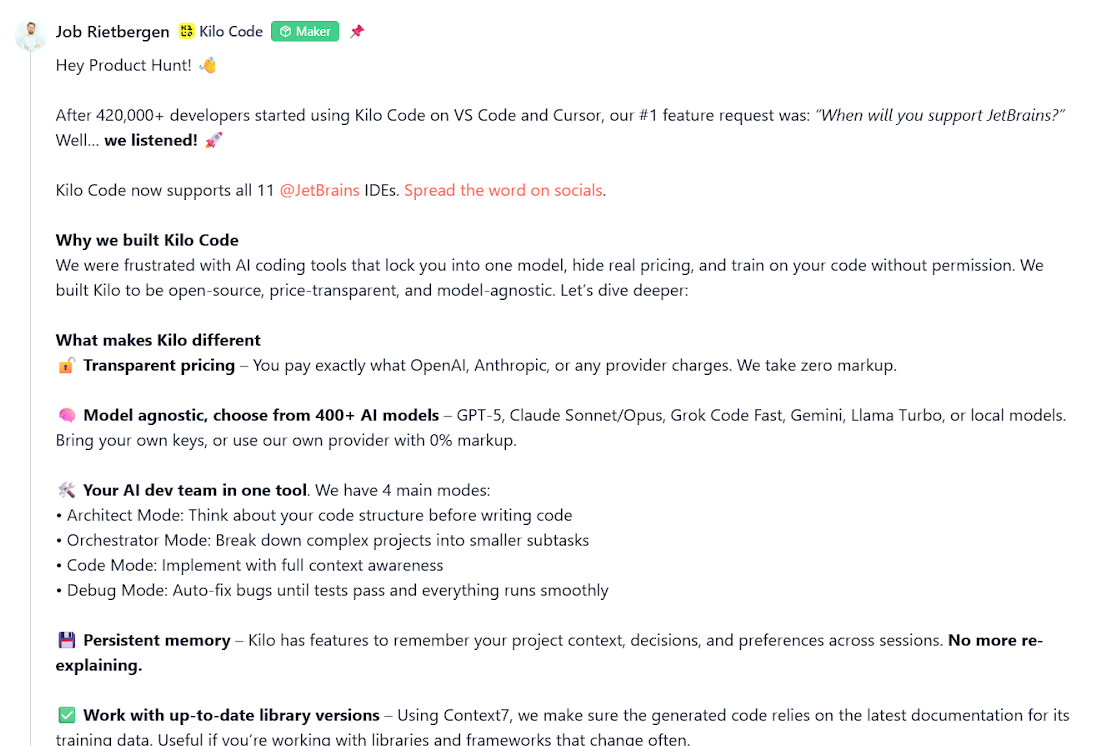
Kilo Code's JetBrains launch is a strong reference. Their maker comment immediately anchored the update in demand by citing existing usage and calling out JetBrains support as the most requested feature. The message then moved through what the product is, what makes it different, and how developers can use it in practice. The structure kept the thread focused and reduced repetitive questions from the start.
8. Lock the operating model before launch day
A Product Hunt launch moves in short, intense windows of activity. Traffic spikes unexpectedly, comments stack up quickly, and small product or demo issues tend to surface without warning. What slows teams down is rarely volume. The problem is uncertainty around ownership once the day begins.
Before launch, every real-time responsibility should be clearly assigned:
- One person owns the Product Hunt thread and responds to comments
- One person monitors traffic, signups, and activation
- One person manages outgoing communication across LinkedIn, X, and community channels
- One person handles documentation updates, demo reliability, and product issues if something breaks
These roles can be shared in small teams, but ownership must be explicit. This structure keeps the launch running at a steady pace. Comment replies stay fast. Community posts remain consistent. Metrics get tracked without distraction. Product issues get resolved without pulling attention away from the conversation.

Inside the launch of VectorAI DB
How Actian positioned VectorAI DB for developers and drove adoption from day one



Product Hunt launch checklist for developer tools and tech products
1. Launch timing
- The launch date is fixed
- Community and social announcements are aligned with the time zones where users are active
2. Maker and hunter readiness
- Complete your Product Hunt maker profile with a real photo, an accurate bio, and visible activity history
- The Hunter and maker both confirm availability for at least the first six hours after launch
- The tagline is tested on at least five people who have never seen the product before
3. Positioning and page
- The final headline and short description are locked and reviewed by someone outside the team
- The gallery shows product workflows inside an actual developer environment
- One screenshot shows output or result rather than configuration
- One short video or GIF demonstrates a full workflow from start to finish (optional)
- Every image is readable on mobile view
- The primary call to action is clear and leads to one defined goal
4. First comment and FAQ
- The first comment explains what changed, why it matters, and where to start
- It includes one concrete use case developers can recognize
- It ends with a clear call to action that can be tried without signup
- It avoids hype language and near-term roadmap promises
- Common questions about setup, pricing, hosting, integrations, and data handling are pre-answered
- A demo link, playground, or code snippet is ready if relevant
5. Funnel and tracking
- The full path from the Product Hunt listing to the landing page is tested
- The time to first meaningful action is measured in seconds
- The first user experience works without email verification blocking access
- The pricing page loads within expected time under traffic spikes
- The documentation site is live and indexed
- Analytics clearly separates Product Hunt traffic from other sources
- Error tracking and demo stability are verified
6. Communication
- The announcement email is written and scheduled for community members
- Social media posts for LinkedIn and X are prepared
- Community posts for Discord, Slack groups, and forums are ready
- The website banner or homepage update is scheduled
- A one-line product description is prepared for supporters to reuse in their own words
7. Early supporters
- Early users and contributors are informed about the launch time
- Supporters know the exact Product Hunt URL before launch day
- Supporters are spread across at least two platforms such as LinkedIn, X, Discord, or Slack groups
- Supporters understand what type of feedback is useful in the Product Hunt thread
- At least a few users are prepared to share how they use the product
8. Launch day operating model
- One person owns the Product Hunt thread and comment replies
- One person monitors traffic, signups, and activation
- One person manages outbound posts
- One person handles product, demo, and documentation issues
- The team has a shared real-time view of Product Hunt ranking, traffic, and signups
- A short internal escalation path exists for bugs, auth issues, and payment failures
What happens after the launch
For the wider mix around Product Hunt, see developer marketing channels.
If you need distribution beyond Product Hunt itself, use our guide to the top places to post developer content.
Above all, the number one mistake is overthinking the launch. Some teams push too hard and end up hurting their brand in the process. Product Hunt rewards consistency. Launching is challenging, and it is perfectly normal not to get featured or finish in the Top 5.
The day-of spike is not the whole job. After launch, route Product Hunt referrals into a clear first action, treat comments as positioning research, and keep shipping updates worth a return visit so traffic does not collapse once the homepage ranking fades.
Supabase is a good example of this approach. They launched on Product Hunt multiple times, but only 9 of their 16 launches received awards. Instead of treating that as a setback, they continued shipping meaningful updates, gathering feedback, and returning with something new to share. Over time, those launches compounded into a larger follower base, stronger brand recognition, and greater visibility on the platform.
The teams that succeed on Product Hunt treat it as an ongoing channel rather than a one-time event. They prepare well, launch consistently, listen to feedback, and give developers a reason to come back. That is how momentum builds over time.
A Product Hunt launch is often the beginning of a developer marketing program, not the end. The visibility and feedback generated during a devtool or tech product launch need to be supported by documentation, content, community, developer experience, and ongoing go-to-market execution. The complete developer marketing guide explores how these pieces work together to drive long-term adoption and growth.
If you are building a developer tool and need help turning launches, content, community, and developer engagement into a repeatable growth engine, Hackmamba is a developer marketing agency that helps devtool companies execute developer-focused go-to-market strategies from awareness to adoption.
FAQs
1, How do you launch a developer tool on Product Hunt?
To launch a developer tool on Product Hunt: set up your maker profile at least 30 days before launch, prepare your gallery images and all copy before the day itself, bring in a Hunter to review your first impression, go live at 12:01 AM Pacific Time, and activate your supporter network immediately. The first four hours determine your ranking trajectory, so assign clear ownership for comments, tracking, and outbound communication before the page goes live. Treat it as one launch in a series, not a single event.
2, How does the Product Hunt algorithm work for devtools?
Product Hunt ranking is based on points, not raw upvote count. Votes from verified and active users with strong contribution history carry significantly more weight than upvotes from new or inactive accounts. Sustained discussion, replies, and maker participation keep a product visible throughout the day. Manipulation tactics like purchased votes or coordinated new-account voting are actively filtered and can result in a launch being unfeatured. Quality of engagement from real Product Hunt users matters more than volume.
3, Is a Hunter necessary to launch a developer tool on Product Hunt?
Not required, but recommended. Around 79% of featured posts are self-hunted, so a Hunter is not a prerequisite for a strong launch. What a Hunter like Flo Merian provides is an external perspective before the page goes live: pressure-testing your tagline, gallery, and first comment against someone who has seen hundreds of devtool launches. That review often catches clarity problems that teams miss because they are too close to their own product. A Hunter with a developer tool track record is more valuable than a Hunter with a large following who does not understand the audience.
4, What is the best time and day to launch on Product Hunt for a developer tool?
All Product Hunt launches go live at 12:01 AM Pacific Time. You cannot choose a different launch time. For day of week, mid-week (Tuesday to Thursday) attracts the most overall traffic but also the most competition. Weekends can be effective for developer tools because the proportion of developers browsing the platform is higher and attention is less fragmented. The choice should be based on when your target audience is most active, not on conventional wisdom about traffic volume.
5, Is Product Hunt free to launch?
There is no usual paid fee just to list a product. Cost is prep time, creative, and any optional ads or hunter support. Confirm current Product Hunt plans before you budget.